Audio Delay Test
Audio Delay Test
Audio Delay Test is a free in-browser flash-and-beep tool that estimates how many milliseconds your sound is behind (or ahead of) video.
Listing signals
Popularity
Medium
Page views, clicks to the site and upvotes in the last 30 days, ranked against every live listing.
What is Audio Delay Test?
Audio Delay Test is a free browser-based audio latency tool that estimates how many milliseconds your sound lags behind (or leads) what you see for headphones, speakers, and TVs.
How the test works
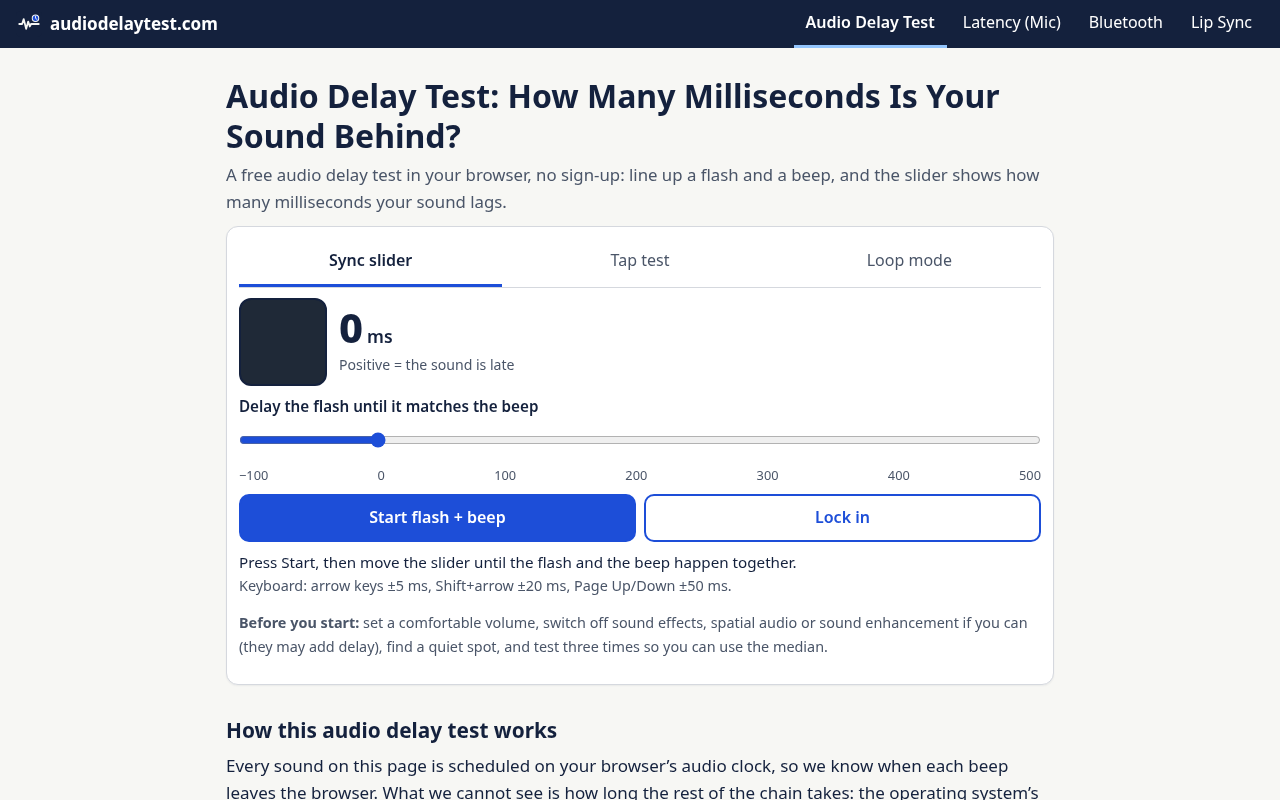
You run the flash-and-beep sync test, then use the slider to line up when the flashing square and the beep feel like a single event. The slider value is your estimated audio delay:
- Positive delay = the sound is late (the beep trails the flash)
- Negative delay = the sound is early (the beep happens before the flash)
For steadier results, lock in multiple readings and use the median. You can also check left/right when you test a new pair of headphones or a new output device.
What the result means
Audio Delay Test estimates end-to-end delay across the whole playback chain—browser timing, operating system buffering, connection behavior (including wireless), and device processing. Because of that, results can vary across browsers, devices, and repeated runs.
The tool includes a practical verdict for watching video using widely cited viewer averages from ITU-R BT.1359:
- Late by up to 125 ms: Small
- Late by 126–185 ms: Noticeable
- Late by more than 185 ms: Large
- Early by up to 45 ms: Small
- Early by 46–90 ms: Noticeable
- Early by more than 90 ms: Large
These thresholds are averages from subjective tests, not hard limits, and your own perception matters.
Methods included
- Sync slider: the main milliseconds estimate (repeat 3 times and use the median)
- Tap test: a second opinion by comparing tapping to flash vs tapping to beep
- Loop mode: repeated full-screen playback for visual A/V judgement (no number on its own)
Tips to improve measurement quality
Before you start: set a comfortable volume and, if possible, switch off sound effects, spatial audio, or sound enhancement (they can add delay). Use a quiet spot and test three times so you can use the median.
Audio Delay Test needs no app installation or sign-up, and it does not upload anything.
Audio Delay Test FAQ
What does a positive or negative result mean?
Audio Delay Test shows delay on its slider: a positive number means the sound reaches you after the picture, and a negative number means the sound arrives before the picture.
How do I get the most reliable measurement?
Press Start, then move the slider until the flash and beep feel simultaneous. Take multiple runs (for the main sync slider, use the median) and test left and right when you change headphones or switch to a new output device.
Why do my results change from one run to the next?
Audio Delay Test estimates end-to-end delay across browser timing, system buffering, connection behavior, and device processing. Small differences between runs—especially with wireless link buffering—can shift the estimated value.
Does this test use my microphone?
Audio Delay Test does not use your microphone. It plays beeps and shows flashes, calculates timing in your browser, and does not require mic input.
Can I use this to check TV or soundbar lip sync?
Yes. Use the sync slider for a milliseconds estimate, and use loop mode to visually judge whether audio and video feel aligned during repeated full-screen playback.
How accurate is the test compared with a codec value?
Audio Delay Test reports a real-world estimate of end-to-end delay (browser + system + connection + device processing), not the codec figure printed on product specs. Results can differ across browsers and repeated runs.
What is a normal audio delay for Bluetooth headphones?
For watching video, Audio Delay Test provides a verdict based on subjective averages: late sound is generally considered detectable around ~125 ms and unacceptable around ~185 ms, with early sound averaging detect/reject thresholds around ~45 ms and ~90 ms.
What are some alternatives to Audio Delay Test?
Similar listings to compare with Audio Delay Test:
- The Audio Stuff: Audio review hub plus browser audio testing tools for comparing gear and settings.
- AudioUtils: Free in-browser audio conversion tool that helps with format and playback preparation.
- denoisr: Audio cleanup tool when delay issues are mixed with echo or background noise.