
Plimo
Plimo
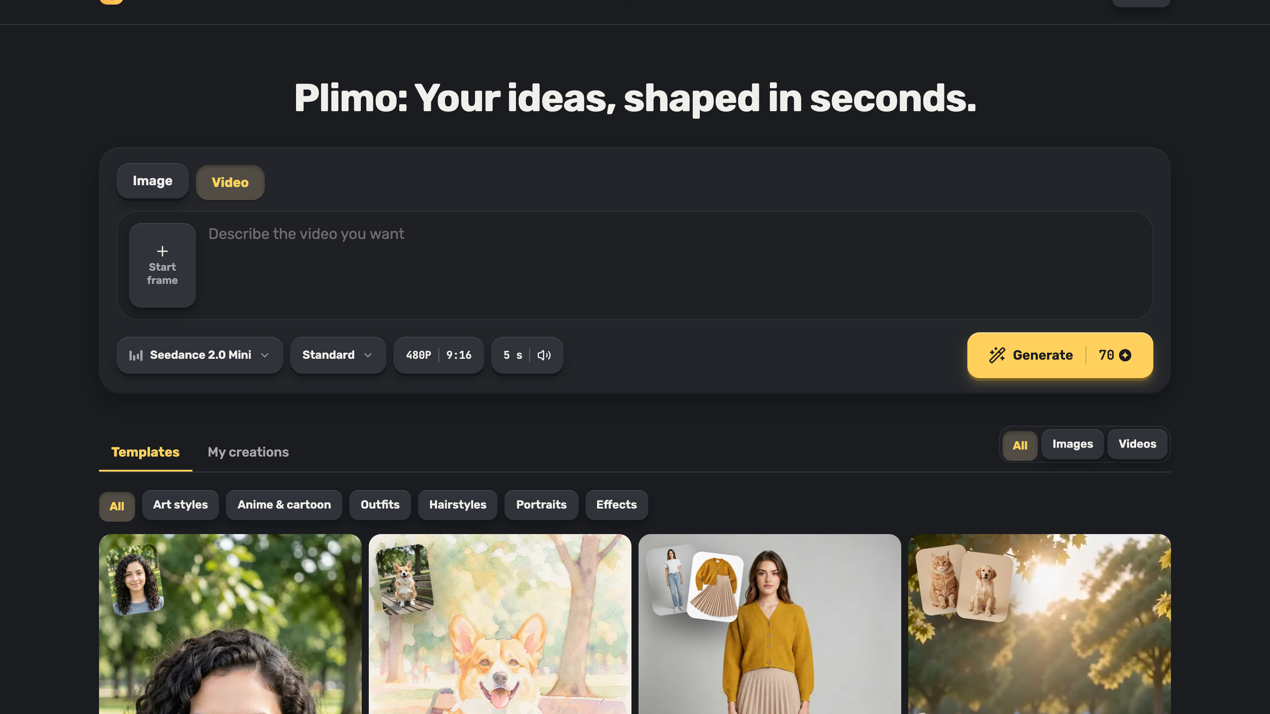
Plimo is an all-in-one AI image and video generator where one account and one set of credits covers multiple models and templates.
Listing signals
Popularity
High
Page views, clicks to the site and upvotes in the last 30 days, ranked against every live listing.
What is Plimo?
Plimo is an all-in-one AI image and video generator that helps you create, edit, and turn photos into clips using multiple models under one account.
One account for images and video
Plimo brings a set of AI image models and AI video models together behind a single login and a shared credit system, so you don’t need separate subscriptions for image vs. video workflows. Images and videos use the same credits, letting you move from a still idea to a clip without switching tools.
Plimo also includes widely shared templates. Templates come pre-loaded with the prompt and settings for a trending look, so you can add a photo and generate quickly.
What you can make
Common creation paths include:
- Restyle a photo in a chosen art style or theme while keeping the person and framing.
- Try new looks like hairstyles and outfits using photo-based tools.
- Turn a photo into a video with Image to Video so the uploaded image becomes the first frame.
- Create video from a one-line idea using Text to Video.
Plimo supports model-to-model comparisons: run the same prompt or photo across different models and keep the result you prefer.
Model variety for different outputs
Choose among 15 AI image models and 17 AI video models, including options designed for multi-reference editing and text clarity, plus video models that support different clip styles and lengths. For example, Kling offers one-take clips (up to 30 seconds) with sound; Veo is built for a filmed look with sound and up to 4K; and Seedance is a short AI video model with sound and can blend faces from your photo with a reference video.
Downloads without a watermark
Downloaded images and videos come without a watermark.
How to start using Plimo
- Pick a tool or template (image generator, photo editor, image to video, text to video, and more).
- Upload a photo or enter a prompt. Templates can already include the prompt and settings.
- Generate, refine by changing details, and download.
Pricing and credits
Plimo offers a free start plus paid plans with monthly credits:
- Free: includes free credits to try the trial models (100 free credits when you sign up).
- Plus: $7.50/mo billed $90 yearly; 3,000 credits/month.
- Pro: $14.50/mo billed $174 yearly; 8,000 credits/month.
- Ultra: $64.50/mo billed $774 yearly; 50,000 credits/month.
Plans also specify “images at once” and “videos at once,” plus how long creations are kept (30/90/360 days for paid tiers).
Plimo FAQ
Is Plimo free to try?
Yes. Plimo is free to start and includes 100 free credits when you sign up to try the trial models.
Do I need an account to use Plimo?
Yes. Plimo works through a single account, so your model access, creations, and credits are managed together.
Do I have to write prompts to use Plimo?
No. Many templates come with the prompt and settings already prepared, so you may only need to add your photo.
Can Plimo turn a photo into a video?
Yes. With Image to Video, you upload a photo and your image becomes the first frame of the clip, then you set what should move.
Will Plimo downloads include a watermark?
No. Plimo downloads come without a watermark, including on free.
Does Plimo support business or commercial use?
Paid plans include commercial use, while the free plan does not include commercial use.
How long are creations kept on Plimo?
Creations are kept for 30 days on Plus, 90 days on Pro, and 360 days on Ultra.
What are some alternatives to Plimo?
Similar listings to compare with Plimo:
- Z Image AI: Multi-model image generator with free 100 credits and fast downloads.
- shotai.app: All-in-one AI image and video creator using multiple advanced models.
- FreeVideoGenerator: Free AI video generator for text prompts and photo-based clips.
- ailensgo.com: All-in-one anime video generator turning text/photos/video into animated clips.