
cursivegenerators.org
Cursive Text Generator
Generate cursive text from your typing—copy-paste Unicode for social posts or download PNG/SVG real-font images for consistent design assets.
Listing signals
Domain rating
19
Domain rating is Ahrefs' measure of domain quality according to links.
Popularity
Low
Page views, clicks to the site and upvotes in the last 30 days, ranked against every live listing.
About tool
Cursive Generators is a free online tool that converts plain text into handwriting-style cursive designs. Type a name, word, quote, brand phrase, classroom label, or personal message to preview multiple cursive, script, calligraphy, decorative, and signature-like styles.
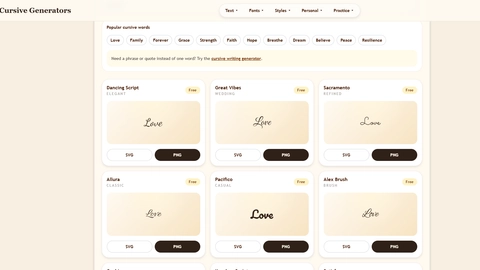
Choose your output based on how you’ll use it. For quick sharing, copy-paste Unicode cursive text for social bios, captions, Discord names, short messages, and profile snippets. For visual consistency, download “real font” cursive images—PNG for transparent, everyday graphics and SVG for crisp, scalable vector artwork.
Compare styles instantly in one place, then export the version that fits your workflow. It’s designed to be easy to reach with no sign-up, payment, or complicated setup.
What can I type into Cursive Generators?
You can enter short display text such as names, quotes, brand phrases, tattoo ideas, classroom labels, or a short social profile line. The preview updates as you type.
What’s the difference between copy-paste Unicode cursive and downloadable cursive images?
Unicode cursive converts your letters into Unicode characters you can paste as text. Downloadable PNG/SVG turns the text into an image or vector file so the visual styling stays consistent wherever you place it.
Why might Unicode cursive look different (or show boxes) on some devices?
Unicode cursive depends on how a device or app renders those characters. Some environments may use fallback fonts or miss glyphs, which can change the look or display.
Can I download cursive as PNG or SVG?
Yes. PNG is typically used for transparent, easy-to-share graphics, while SVG is best when you need crisp, scalable artwork.
Do I need an account or payment to use the generator?
No—create cursive text, copy outputs, and download PNG/SVG without signing up or paying.
Which should I use for signatures or tattoo references?
Use the downloadable real-font mode when you need a consistent visual asset (for example, a transparent PNG for a signature or a clear image/vector reference for a tattoo idea). Use Unicode when you just need a quick decorative text version to paste.