
justmarkdown.com
Markdown Editor With Chat
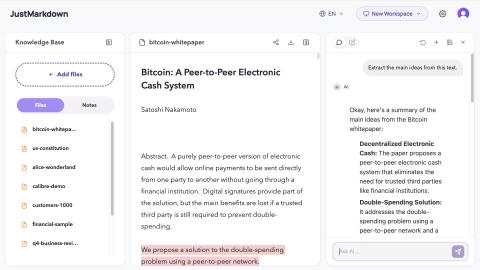
JustMarkdown turns messy documents into clean Markdown, then lets you read, chat with AI, and export notes in the same workspace.
Listing signals
Domain rating
30
Domain rating is Ahrefs' measure of domain quality according to links.
Popularity
Low
Page views, clicks to the site and upvotes in the last 30 days, ranked against every live listing.
About tool
JustMarkdown is a document-to-Markdown workspace that converts PDFs, EPUBs, Word files, HTML, images, and more into clean, editable Markdown—so your content stays usable for research, drafting, and knowledge capture.
Once converted, you can keep working in the same flow: annotate, ask AI questions about the document, and reorganize your notes without switching between separate apps. The result is a connected knowledge base rather than fragmented highlights and drafts.
You can also export your polished Markdown to formats like PDF, Word, HTML, or image. For AI and agent workflows, JustMarkdown is available as an MCP server (e.g., for Claude/Cursor) that can convert URLs and documents into Markdown inside an MCP client.
What does JustMarkdown do after converting a file to Markdown?
You can edit the extracted Markdown in place, add annotations, and ask the built-in AI assistant questions about the document. When you’re ready, you can export your work to common formats like PDF, Word, or HTML.
Which source types work well with the document-to-Markdown workflow?
It supports many common inputs such as PDFs, EPUBs, Word documents, web pages/URLs, HTML files, images (with OCR), spreadsheets, and audio transcription. The goal is to turn messy sources into clean Markdown for continued writing and research.
Is conversion a one-off download, or can I keep editing?
You can keep editing after conversion. The converted content remains an editable Markdown result within the same workspace so you can refine, expand, annotate, and export later.
Can JustMarkdown be used with Claude or Cursor?
Yes—JustMarkdown can be used via an MCP server in compatible MCP clients like Claude and Cursor. This lets you convert documents and URLs into clean Markdown directly in the conversation context.
Do I need an account or API key to use the hosted endpoint?
No. The hosted endpoint works anonymously with a small daily quota, and an API key is optional for unlocking additional capabilities like OCR and higher limits.
How does exporting work once I’ve built notes in Markdown?
Export your Markdown from the same workspace into formats such as PDF, Word, HTML, or image. This supports sharing or publishing without manually reformatting from scratch.