TaskPocket
TaskPocket
TaskPocket is a calm to-do app for the browser and iPhone that turns natural text into tasks with dates, repeats, and file attachments.
Listing signals
Popularity
High
Page views, clicks to the site and upvotes in the last 30 days, ranked against every live listing.
What is TaskPocket?
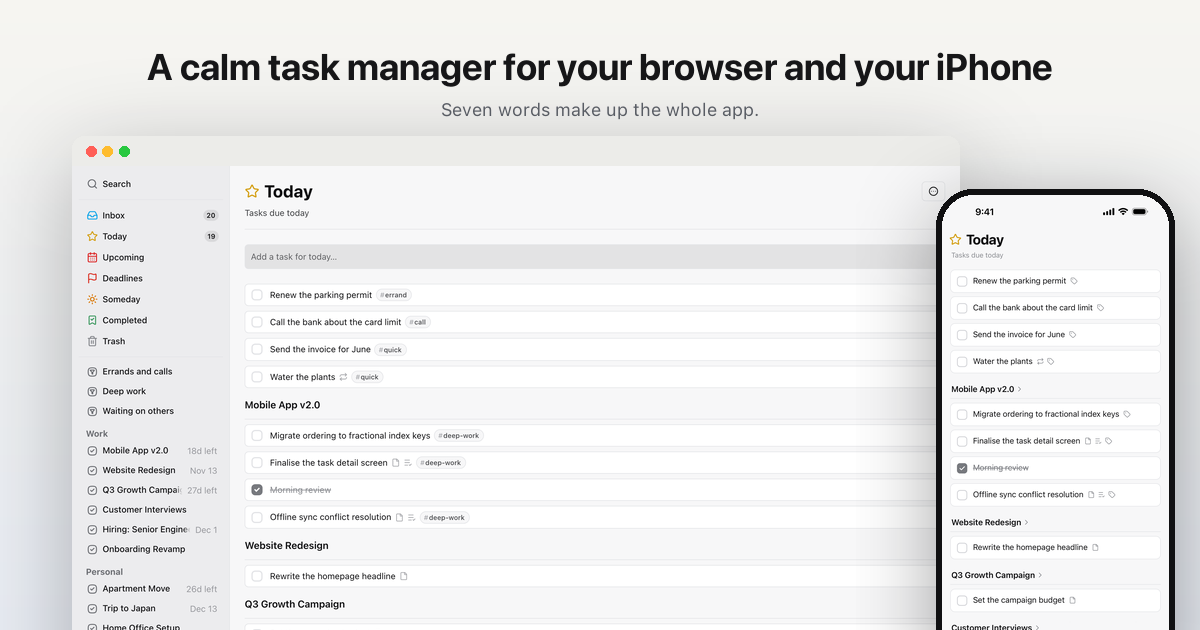
TaskPocket is a simple task manager for any browser and iPhone, built around seven core ideas. Your work starts in Inbox and moves into Today, Upcoming, Deadlines, Someday, and Projects (organized inside Areas) as you decide what matters and when.
Create tasks by typing naturally—enter a date or repeat phrase and TaskPocket lifts it out of the sentence so you don’t have to build your system from scratch. Add notes with formatting and clickable links, include checklists with drag-and-drop ordering, and set repeats that survive real life—whether based on a schedule or after completion.
Keep momentum without clutter: tasks sort into the views you need (Today and its grouped projects, plus Upcoming, Deadlines, Someday, and Completed). Attach files directly to tasks (photos, PDFs, documents, and more), and export everything as JSON when you want a backup or to move your data elsewhere.
TaskPocket FAQ
Can I type tasks in plain sentences and still set dates or repeats?
Yes. If you include a date or a repeat in your title, TaskPocket extracts it and sets the relevant fields for you, and you can adjust anything afterward.
How do Today and Deadlines differ?
Today is based on your start date (when you plan to begin), while Deadlines answers the due date question (when it’s actually due).
Does TaskPocket support recurring tasks that adapt after completion?
Yes. You can set repeats to follow a fixed schedule or to schedule the next occurrence based on the day you check the task off.
Is there offline support on iPhone?
Yes. Tasks live on the device so you can add, reorder, and complete without a signal, and they sync when you’re back online. The web app needs a connection.
Can I add files to a task?
Yes. You can attach pictures, PDFs, documents, and notes to the task, view previews in the app, and open different file types accordingly.
Can I export my tasks and projects?
Yes. Export everything as JSON, and the export is available on every plan.