
Tunenoodle
Tunenoodle
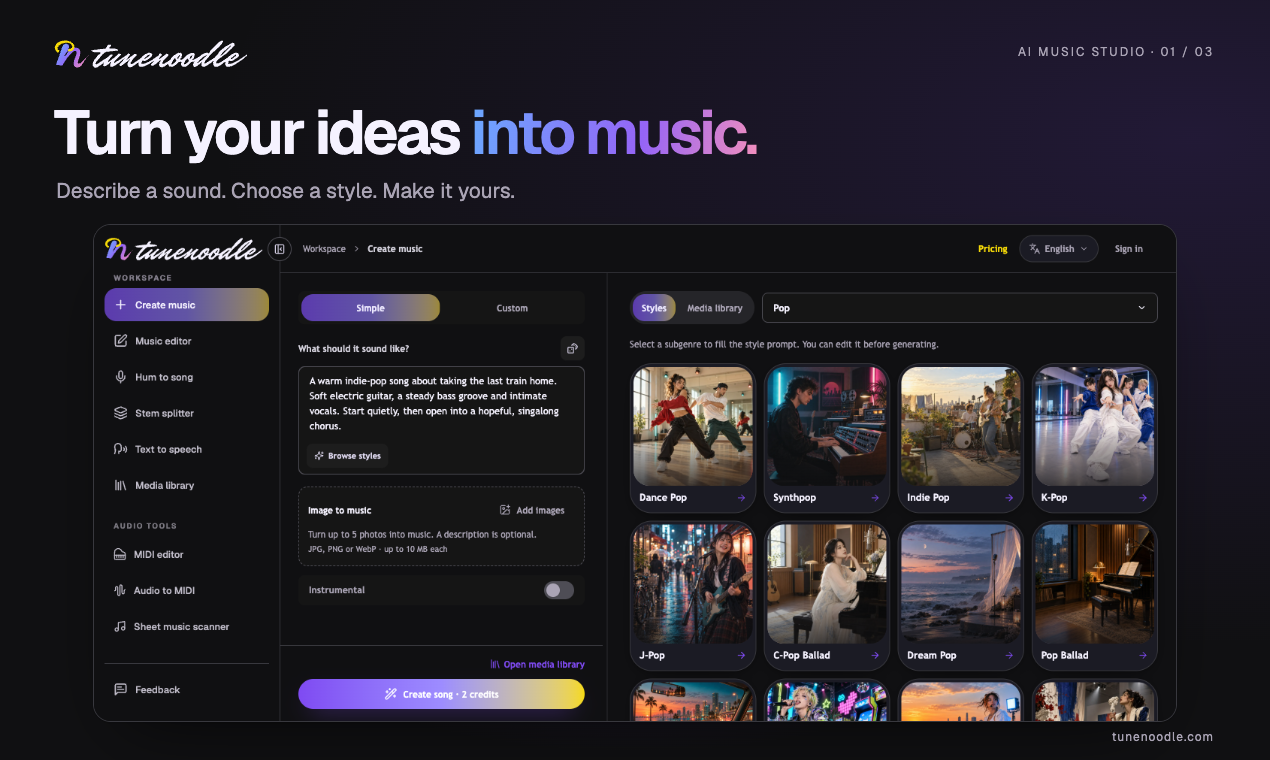
Tunenoodle is a browser-based AI music studio that turns lyrics or ideas into songs and provides local audio tools like stem separation and audio-to-MIDI.
Listing signals
Popularity
Low
Page views, clicks to the site and upvotes in the last 30 days, ranked against every live listing.
What is Tunenoodle?
Tunenoodle is a browser-based AI music studio for creating, shaping, and downloading generated songs from ideas or lyrics, plus a set of in-browser audio and music tools.
Create songs from ideas, lyrics, or humming
Start by describing the song you want—style, instruments, and what should happen in the track—or bring lyrics or a hummed melody. Tunenoodle lets you choose an instrumental or vocals workflow and then generates audio you can keep shaping until it matches what you hear in your head.
New users begin with 20 free credits at signup, described as enough to create up to 20 songs. Before you commit to generation, the interface shows the credit cost.
Edit and remix in your private media library
Finished songs are saved in a private media library. From there, you can listen, download, and continue working on the track. Tunenoodle supports workflows like extending a track, replacing sections, or creating a mashup while keeping the original version. AI edits use credits and create new versions.
Local audio and music tools without sign-in
Tunenoodle also includes browser-based audio tools that run locally—no sign-in and no credits—covering:
- Stem splitter (stem separation)
- Audio to MIDI for turning melodies into editable MIDI notes
- MIDI editor for adjusting pitches and timing and exporting MIDI
- Tap Tempo, which estimates tempo from your timing (no microphone and no upload)
It also offers additional creative utilities such as audio speed & pitch changer, slowed + reverb, spectrum & pitch analyzer, stereo phase check, smart silence remover, dynamics workbench, release information, ear training, tone & sweep generator, and trim audio.
How credits and downloads work
Previewing templates and using local tools is free. Downloading generated songs requires either a purchased credit pack or an active membership.
- Standard generation with lyrics costs 2 credits, while a separate lyrics generation costs 1 credit (requesting both spends 3).
- Credit packs are one-time purchases and credits never expire.
- Membership credits arrive once per paid period and expire when that period ends.
Get started
Use the AI music generator to describe the song, review the shown credit cost, and generate. Local tools are available directly in the browser, while saving and downloading generated songs require signing in and paid credits.
Tunenoodle FAQ
Do I need an account to use Tunenoodle?
You can preview homepage templates and use Tunenoodle’s browser-local tools without signing in. Creating songs, uploading reference media for AI generation, and saving to Tunenoodle’s private library requires signing in. Generation shows the credit cost before you submit.
How much does a song cost in Tunenoodle?
Each Tunenoodle song generation costs the number of credits shown next to the Create button before you commit. New accounts start with 20 free credits at signup. More credits are available via one-time credit packs or a membership.
What’s free versus what requires a plan on Tunenoodle?
On Tunenoodle, previewing templates and using browser-local tools is free. Downloading generated songs requires purchasing a credit pack or having an active membership. Local audio tools like speed/pitch changes, slowed reverb, and local trimming run in your browser without sign-in or credits.
Do audio tools in Tunenoodle upload my files for processing?
Local tools on Tunenoodle process in your browser for tasks like speed and pitch changes, slowed reverb, and local audio trimming. Uploading images or audio for AI generation, uploading media for saving, or saving trimmed results requires uploading the relevant files.
Can I keep editing a generated song in Tunenoodle?
Yes. Tunenoodle saves finished songs in your private media library, where you can extend a track, replace a section, or create a mashup. AI edits use credits and produce new versions while preserving the original.
How does Tap Tempo work in Tunenoodle?
Tap Tempo in Tunenoodle measures your timing to estimate tempo. It doesn’t use a microphone and doesn’t require uploading audio—just tap along to the track.
How do credit packs and memberships work on Tunenoodle?
Tunenoodle credit packs are one-time purchases with credits that never expire. Memberships deliver credits once per paid period (monthly, quarterly, or yearly), and those credits expire at the end of the period. Both options unlock downloads of your cloud songs.
What are some alternatives to Tunenoodle?
Similar listings to compare with Tunenoodle:
- MakeBPM: AI music studio that turns prompts/lyrics/audio into songs and beats with downloadable outputs.
- GeminiMusic: AI song generator that creates tracks and instrumentals with saved history for iteration.
- MusicGPT: AI music generator for complete original songs from descriptions and lyrics, optimized for refinement.
- AudioUtils: Free browser-based audio converter focused on local conversions without signup.