
inputtranslator.com
Typing Translator Desktop
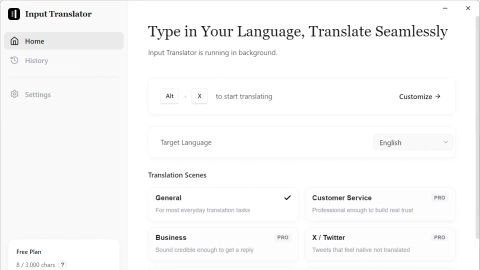
InputTranslator is a desktop typing translator that instantly translates any input field in-place—perfect for chat, work tools, and game chat on Windows.
Listing signals
Domain rating
4
Domain rating is Ahrefs' measure of domain quality according to links.
Popularity
Low
Page views, clicks to the site and upvotes in the last 30 days, ranked against every live listing.
About tool
InputTranslator is a typing translator for Windows that converts what you write directly inside the same input field—no copy, no switch, no paste. Simply type normally, then press the hotkey to get an instant translation inserted in-place, helping you stay in the flow.
It’s built to work across real-world communication contexts, including browser and desktop apps as well as game chat. Built-in scenarios let you tune translations for different tones like Chat, Business, Support, and Social so the output matches what you’re trying to communicate.
Your translation data is handled with privacy in mind: translations are destroyed upon completion, and history is kept only on your local device. Start with the free plan, and upgrade for higher limits, advanced AI translation models, all scenarios, and priority customer support.
How does InputTranslator translate without copy-and-paste?
Type normally in any input field, then press the hotkey (Ctrl + Alt + X). The translated text is inserted instantly into the same field.
Which types of apps and input fields does it support on Windows?
It targets input fields across browser and desktop apps, including tools like Discord, Slack, Telegram, WhatsApp, Gmail, Notion, VS Code, and more—plus game chat.
What are translation scenarios, and when should I use them?
Scenarios adjust how the translation is produced for different contexts like Chat, Business, Support, and Social. Use the scenario that best matches the tone you want.
Is my translation history stored in the cloud?
No. Translations are destroyed upon completion, and translation history exists only on your local device.
What does the free plan include?
The free plan is $0/month with 3,000 characters per week, basic AI translation models, 200 characters per translation, and 1 custom translation scenario.
What do I get with the Pro plan?
Pro upgrades include unlimited translations, advanced AI translation models, 10,000 characters per translation, all translation scenarios, and priority customer support.