add-person-to-photo.com
Add Person To Photo
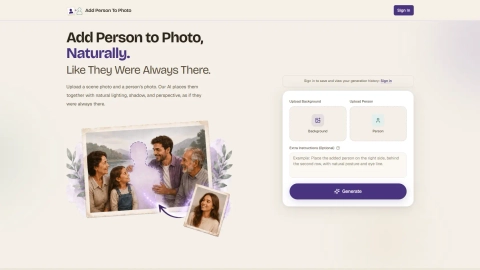
Add-person-to-photo.com inserts a person into your existing images with matched lighting, shadow, and perspective for a seamless composite.
Listing signals
Domain rating
28
Domain rating is Ahrefs' measure of domain quality according to links.
Popularity
Medium
Page views, clicks to the site and upvotes in the last 30 days, ranked against every live listing.
About tool
Add Person To Photo is an AI image editor that helps you place a missing person into an existing scene. Upload the background photo you want to complete and a clear portrait of the person to add, then generate a natural-looking blend.
The focus is realism: lighting, shadow, perspective, and skin tone are matched so the added person looks like they were always there. You can use Extra Instructions to guide placement in crowded scenes, adjust depth and scale, and make the result look connected (for example, holding hands or leaning in).
You can preview your composite and download in HD as PNG or JPG in your chosen aspect ratio. Sign in to save and view your generation history, and use credit packs for one-time purchases to create additional edits.
What photos do I need to add someone to a picture?
Upload your scene photo as the background and a clear portrait photo of the person you want to add. The portrait should be detailed enough for the AI to match face, skin tone, and body proportions.
How does the tool make the added person look realistic in the scene?
It matches lighting direction, shadow softness, color temperature, and skin tone from the original scene to the inserted subject so there aren’t obvious cut-out edges or color mismatches.
Can I control where the person appears in a group photo?
Yes. Use Extra Instructions to specify placement such as left/right/center, foreground/background, or positioning behind the front row to match your photo’s layout.
What if the added person looks at the wrong size or depth?
Adjust depth and scale using Extra Instructions—for example, place them slightly in the foreground to bring them forward, or use “background” and “smaller scale” to push them farther back.
Will it work with illustrations or black-and-white photos?
Yes. You can request style matching so the added person adapts to the artistic medium and look of the original image, including color palette and texture.
Can I download my result after generating?
Yes. Preview your blend, then download as PNG or JPG in the aspect ratio you chose.