
stampdy.com
AI Stamp Generator
Stampdy is a free online AI stamp maker to design custom rubber stamps, signature stamps, and seals in your browser and download them instantly.
Listing signals
Domain rating
10
Domain rating is Ahrefs' measure of domain quality according to links.
Popularity
Medium
Page views, clicks to the site and upvotes in the last 30 days, ranked against every live listing.
About tool
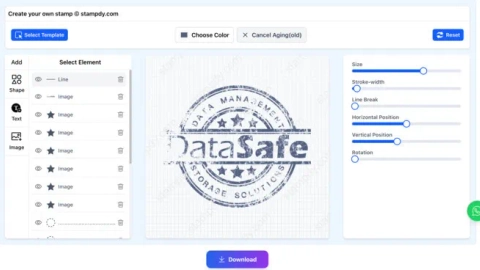
Stampdy is a free online stamp maker for creating custom rubber stamps, signature stamps, and official-looking business seals. You can start from templates, enter your text, pick a shape and style, and add elements like a logo or icon—then preview your stamp live as you edit.
The editor supports multiple layout styles (including round, rectangular, oval, and triangle) with controls for details such as font, font size, spacing, alignment, rotation, and element positioning. Projects can be saved so you can come back to refine and reuse your stamp design.
When your stamp is ready, download it in formats including PNG, JPG, SVG, EPS, PDF, and DOCX. You can also convert to PDF and insert into Word for digital document workflows, or export files for sending to a print shop for physical production.
Do I need to register to use Stampdy?
No—Stampdy can be used without registration to design and edit stamps in the browser.
What kinds of stamps can I create with Stampdy?
You can create rubber stamps, signature stamps, and custom business seals. It also includes many stamp templates for common use cases like company seals and notary-style stamps.
Can I add a logo or image to my stamp?
Yes. You can add an image/logo element and adjust its size and position within the stamp design.
What stamp shapes are available?
You can design stamps in several layouts, including round, rectangular, oval, and triangle styles, plus templates for specific categories like company seals and bank stamps.
Which file formats can I download from Stampdy?
You can download your stamp in PNG, JPG, SVG, EPS, PDF, and DOCX (depending on your workflow).
Can I use the stamp with Word or PDFs?
Yes. Stampdy provides options to convert to PDF and insert into Word, so you can use your stamp in digital document approvals.
Is the stamp design process mobile-friendly?
Yes. You can create stamps online from a phone, tablet, or desktop since the tool runs in the browser.