
AUTOMATER.ai
AUTOMATER.ai
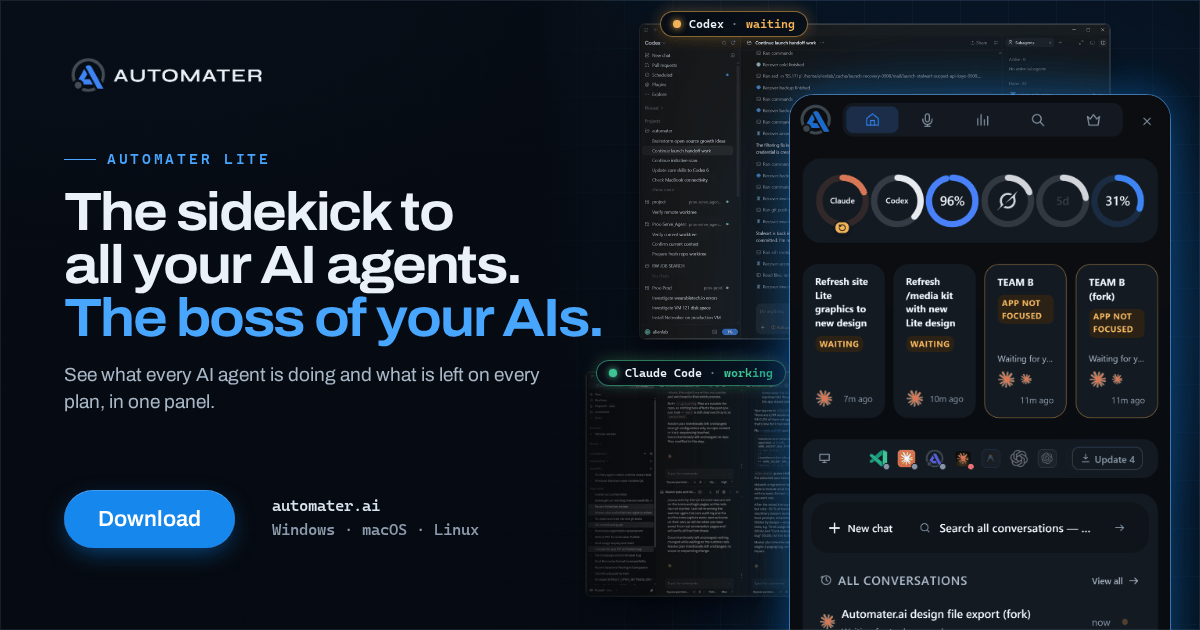
AUTOMATER.ai organizes your AI coding sessions in one local tray panel, flags “Needs you” approvals, and tracks usage across 9 providers.
Listing signals
Popularity
High
Page views, clicks to the site and upvotes in the last 30 days, ranked against every live listing.
What is AUTOMATER.ai?
AUTOMATER.ai is a free local tray app that consolidates AI coding sessions into a searchable library, flags permission prompts, and tracks usage across 9 providers for Windows, macOS (Apple silicon), and Linux.
What AUTOMATER.ai does
AUTOMATER.ai (Automater Lite) brings your AI coding workflows into one place so you stop switching between terminals and desktop app windows. It indexes session transcripts already stored on your machine, then surfaces them in a single tray panel for fast search and quick resuming.
The core features are designed around “agent activity” and approvals:
- A searchable local library of AI CLI and desktop sessions (titles and conversations indexed)
- “Needs you” flags when an agent is waiting for permission or input
- A usage meter that shows what’s left on each connected plan across 9 providers
- Local voice dictation and status updates from the tray (cloud voice is available only with PRO)
One tray panel for every supported tool
Lite monitors agent and session activity from your tray. When an agent asks for approval, permission prompts, questions, or “y/n” style decisions, the session is flagged so you can quickly find what’s waiting for your input.
Searches and resumes from one library
Instead of hunting through scattered histories, AUTOMATER.ai provides one local search that can find the conversation you need across supported AI apps and CLIs. For sessions that can be resumed, Lite can reopen them in their own CLI.
Privacy and data location
Lite keeps session content on your machine. There is no account requirement for Lite, and the library is stored locally.
Supported platforms and workload fit
AUTOMATER Lite runs on Windows, macOS (Apple silicon), and Linux. It reads sessions from 41 apps and CLIs written in 45 session formats, and meters 9 providers.
Pricing and upgrade path
Automater Lite is free and requires no signup. Optional PRO adds action-oriented features, including built-in tools on the Home tab, a PRO tab with advanced cards, and phone access with optional cloud sync. Lite’s library stays local whether you upgrade or not.
How to get started
Download Automater Lite and install it for your OS. Press Ctrl + Alt + Space to start dictation or use the tray panel for session search, “Needs you” flags, and usage meters.
AUTOMATER.ai FAQ
Is AUTOMATER.ai free to use?
Yes. AUTOMATER.ai’s Automater Lite is free and requires no sign-up. PRO is an optional yearly upgrade that adds action-oriented features, while keeping everything Lite provides.
Where do my AI session histories live in AUTOMATER.ai?
AUTOMATER.ai keeps a searchable local library on your machine. Session content stays on disk rather than being stored on an external account.
How does AUTOMATER.ai flag when an agent needs my input?
AUTOMATER.ai monitors agent activity and flags permission prompts, questions, and approvals as “Needs you,” so the tray panel shows which app or session is waiting for your approval.
Can I search across multiple AI tools with AUTOMATER.ai?
Yes. AUTOMATER.ai indexes sessions into one local library and lets you search across supported AI apps and CLIs, then resume supported sessions in their own CLI.
Does AUTOMATER.ai track usage across providers?
Yes. Automater Lite provides usage meters across 9 providers and helps you see plan usage and reset windows so limits don’t interrupt your work.
Which operating systems are supported by AUTOMATER.ai Lite?
AUTOMATER.ai Lite runs on Windows, macOS (Apple silicon), and Linux.
How do I log in to AUTOMATER.ai?
Use the sign-in page at https://automater.ai/sign-in for the account features associated with PRO.