
pterocos.eu.org
HTML CSS JS Editor
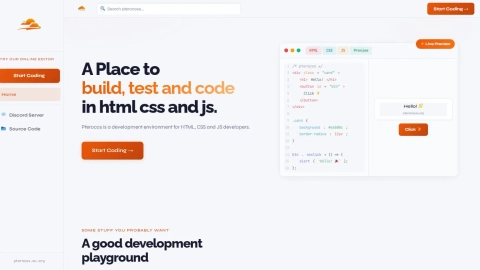
Pterocos.eu.org is a free online HTML/CSS/JS editor with Monaco-based coding, live preview, and an optional AI chat that can use your own API key.
Listing signals
Domain rating
86
Domain rating is Ahrefs' measure of domain quality according to links.
Popularity
Medium
Page views, clicks to the site and upvotes in the last 30 days, ranked against every live listing.
About tool
Pterocos.eu.org is an online code editor for front-end development that lets you write HTML, CSS, and JavaScript in a Monaco-based editor with a live preview.
You can use it for quick iteration directly in your browser without signing in—your work is saved locally in your browser so you can come back later. It also supports optional SCSS, TypeScript, and Babel to fit common modern workflows.
An AI assistant is available to help with debugging and suggestions. You can run with the default server-side AI, or enter your own AI API key to send requests directly from your browser; the key is stored in your browser only and isn’t passed through the site’s servers.
Do I need an account to use Pterocos.eu.org?
No. Projects are saved locally in your browser, so you can use the editor without signing in.
Does Pterocos.eu.org show a live preview as I code?
Yes. Your HTML/CSS/JavaScript edits are reflected in a live preview so you can see results while you work.
What languages and transforms are supported?
You can write HTML, CSS, and JavaScript. Optional support is available for SCSS, TypeScript, and Babel.
Can I use my own AI API key with the AI chat?
Yes. Enter your API key in the browser to send AI requests directly from your browser, without routing your data through the site’s servers.
Which AI providers can I choose?
You can select providers such as OpenAI, Anthropic, Google Gemini, xAI/Grok, Groq, Cerebras, DeepSeek, OpenRouter, Together AI, Fireworks AI, Mistral, Perplexity, Cohere, SambaNova, Forge AI, plus local options like Ollama and LM Studio.
Can I control the AI prompt and model?
Yes. You can optionally set a model and provide a custom system prompt; leaving them blank uses the provider default or the built-in DuckDB expert prompt for DuckDB-focused help.