
trellis-3d.net
Image to 3D Model
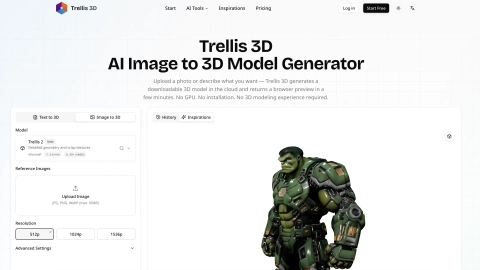
Turn a photo or prompt into a downloadable 3D model in minutes with a browser-based workflow—no GPU, installation, or 3D skills required.
Listing signals
Domain rating
26
Domain rating is Ahrefs' measure of domain quality according to links.
Popularity
Medium
Page views, clicks to the site and upvotes in the last 30 days, ranked against every live listing.
About tool
Trellis 3D is an AI image-to-3D model generator that creates downloadable 3D files from a single photo or from a text prompt. Upload a JPG, PNG, or WebP (up to 10MB), or switch to text mode and describe what you want. Trellis 3D runs the generation in the cloud and returns an interactive 3D preview in your browser.
Choose among available AI models to match your object type. Microsoft Trellis 2 is designed for complex topology, open surfaces, and non-manifold geometry, while Hunyuan 3D focuses on hard-surface precision, and Seed 3D is built for fast generation with strong results on organic forms. Reference images can also help guide output.
When you’re satisfied, export your model for your workflow. Download in common formats including GLB, OBJ, FBX, and USDZ, or export a rotating GIF preview for quick sharing. Most generations complete in a few minutes depending on input complexity and output settings.
What can I use Trellis 3D to generate?
You can generate 3D models from a single image (image-to-3D) or from a text prompt (text-to-3D).
Do I need a GPU or install software to use Trellis 3D?
No. Generation runs in the cloud, and the workflow happens in your browser without installation.
Which image types and size limits are supported for image-to-3D?
Trellis 3D accepts JPG, PNG, and WebP images up to 10MB.
How do I convert an image into a downloadable 3D model?
Upload your image in image-to-3D mode, choose an AI model, generate, then rotate/inspect the result in the viewer and download in your preferred format.
What 3D file formats can I download?
You can export GLB, OBJ, FBX, and USDZ. GLB is recommended for many web and game workflows, while OBJ/FBX are widely used across modeling tools and USDZ supports iOS AR Quick Look.
What should I do to get better results from an input photo?
Use a clear photo with a single centered subject, even lighting, and a plain background. Avoid clutter, motion blur, multiple overlapping objects, and strong directional or atmospheric shadows.