Make Image Transparent
Make Image Transparent
Remake photos or generate new designs as real transparent PNGs with AI—download instantly for your next project.
Listing signals
Popularity
Low
Page views, clicks to the site and upvotes in the last 30 days, ranked against every live listing.
About tool
Make Image Transparent is an AI transparent image maker that helps you turn a photo or a text idea into a transparent PNG you can drop into your designs.
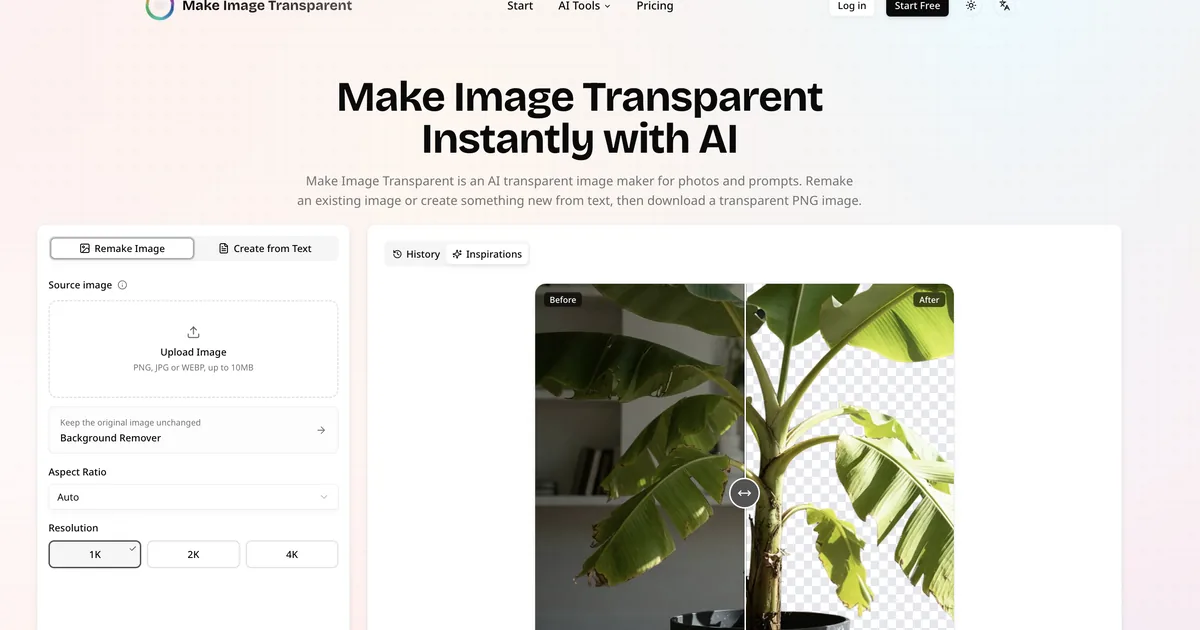
Use Remake Image to upload an existing portrait, product photo, logo, character, or graphic and generate a transparent version with cleaned-up edges. Use Create from Text to describe the subject and style you want—AI creates a transparent PNG directly without you needing to cut it out first.
Choose the aspect ratio that fits your layout and generate in sizes from 1K to 4K. You can also keep the original image unchanged by using Background Remover when exact preservation matters.
What can I make with Make Image Transparent?
You can remake portraits, product images, logos, characters, and graphics into transparent PNGs, or generate new transparent assets from text prompts.
How do I create a transparent PNG from text?
Select Create from Text, describe the subject (including style, view, materials, colors, and lighting), then generate and download the resulting transparent PNG.
What’s the difference between Remake Image and Background Remover?
Remake Image uses generative AI to remake or rebuild the subject with a transparent background. Background Remover removes only the existing background while keeping the original subject unchanged.
Does it create real transparency or just a white background?
The downloaded PNG uses real transparency, so you can place it over other colors and layouts without a baked-in background.
Do I need Photoshop or manual masking to use it?
No. Upload your image or describe what you want, then generate and download the transparent PNG—no masks or clipping paths are required.
How should I improve the results for transparent edges?
Start with a clear, recognizable subject and keep the composition focused on one main element. For text generation, describe the subject first and then add style, materials, colors, lighting, and mood.