omnigemini.io
Omni AI Video Generator
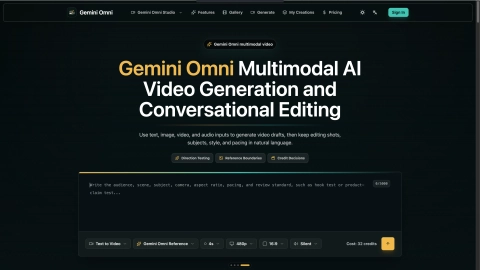
OmniGemini.io helps you prototype Gemini Omni multimodal video and image ideas by generating drafts from prompts and references, then editing in natural language.
Listing signals
Domain rating
4
Domain rating is Ahrefs' measure of domain quality according to links.
Popularity
Low
Page views, clicks to the site and upvotes in the last 30 days, ranked against every live listing.
About tool
OmniGemini.io is a Gemini Omni-style multimodal AI creation workflow for producing video drafts and images from text, image, video, and audio inputs. You can generate a shot, then keep refining direction by editing shots, subjects, style, and pacing using natural language.
The platform is designed for “direction testing”: split your video goals into clear checkpoints (like hook clarity, reference boundaries, product detail, creator tone, motion, and rhythm), generate reviewable samples, and decide whether a shot deserves another pass. This helps you avoid investing too early in higher-production timelines when key choices are still uncertain.
Use OmniGemini.io to prototype short-form openers, product/paid hook screening, creator brief visualizations, feature-step rehearsals, and before/after mode comparisons. Keep prompts, reference materials, and review notes in one browser flow so teams can iterate with context—not guesswork.
What can I generate with OmniGemini.io?
You can generate multimodal video drafts and images using inputs such as text, image, video, and audio, then continue editing based on what you want to change.
How does conversational editing work for video?
After generating a draft, you can continue refining by describing edits in natural language—such as changing shots, subjects, style, or pacing—rather than starting over from scratch.
What does “reference boundaries” mean in OmniGemini.io video tests?
It means you define what must remain recognizable—like a person, product, logo/layout, or style—so remixing doesn’t drift away from the decision you’re trying to validate.
Should I start with a text prompt or an image?
Start with whichever best anchors the shot decision you’re testing. If identity or visual consistency matters (like a person reference or product), use the relevant image/clip as the anchor along with your prompt.
Are the generated samples intended to be final deliverables?
They’re meant to be reviewable direction prototypes. Use the results to decide whether to revise, regenerate, or move into manual editing for final finishing like captions, brand finishing, and multi-track sound.
How do credits fit into the workflow?
OmniGemini.io uses credits for generation, and you can check the cost before submitting a video test run so you can decide whether a shot is worth another pass.