
soniqtools.com
Online Audio Tools
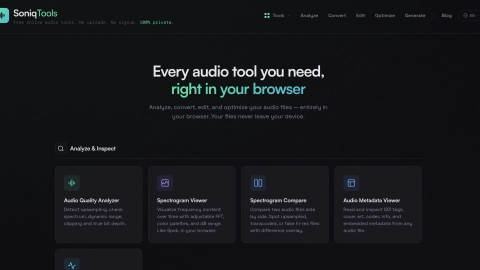
SoniqTools is a free browser-based audio toolkit for analyzing, converting, editing, and optimizing audio—processing runs locally with no uploads or signups.
Listing signals
Domain rating
21
Domain rating is Ahrefs' measure of domain quality according to links.
Popularity
High
Page views, clicks to the site and upvotes in the last 30 days, ranked against every live listing.
About tool
SoniqTools is a free set of browser-based audio tools built for DJs, producers, and audiophiles who want to inspect and transform audio without sharing files online. Use it to analyze sound quality, view waveforms and spectrograms, and check technical details like dynamic range, clipping, and bit depth.
With conversion and editing tools, you can convert between common audio formats (WAV, AIFF, FLAC, MP3, OGG, AAC), extract audio from video, resample to popular sample rates, and change bit depth with dithering. Editing options include trimming with visual start/end points, splitting by silence or time markers, looping with crossfades/fades (including reverse), and merging multiple files with smooth transitions.
For loudness and cleanup, you can normalize loudness to a target LUFS, apply peak normalization, add fade in/out curves, and optimize file size via re-encoding with bitrate settings. Generate tones and noise for testing, create silence for padding, and convert mono/stereo when needed.
All processing happens locally in your browser—no uploads, no signup, and no installs. Start in a new tab and work from any device.
Do I need to upload my audio files to SoniqTools?
No—SoniqTools processes files entirely in your browser, so your audio never leaves your device.
Is there an account or signup required to use the tools?
No signup is needed. You can open the tools in your browser and begin working immediately.
What audio formats can I convert with SoniqTools?
The audio converter supports WAV, AIFF, FLAC, MP3, OGG, and AAC, all locally in your browser.
Can I analyze an audio file’s quality and display frequency content?
Yes. Use the Audio Quality Analyzer for checks like dynamic range, clipping, and true bit depth, and use spectrogram tools (including side-by-side compare) to visualize frequency content over time.
How can I extract audio from a video file?
Use Video to Audio to extract the audio track from formats like MP4, WebM, and MOV.
Can I normalize loudness or adjust fades?
Yes. You can normalize loudness to a target LUFS or apply peak normalization, and you can add fade-in and fade-out curves with adjustable duration and shape.