PatentDrawing.app
PatentDrawing.app
Turn invention descriptions, photos, sketches, and CAD screenshots into patent-style line art, 3D perspective views, flowcharts, and high-res PNGs.
Listing signals
Popularity
Medium
Page views, clicks to the site and upvotes in the last 30 days, ranked against every live listing.
About tool
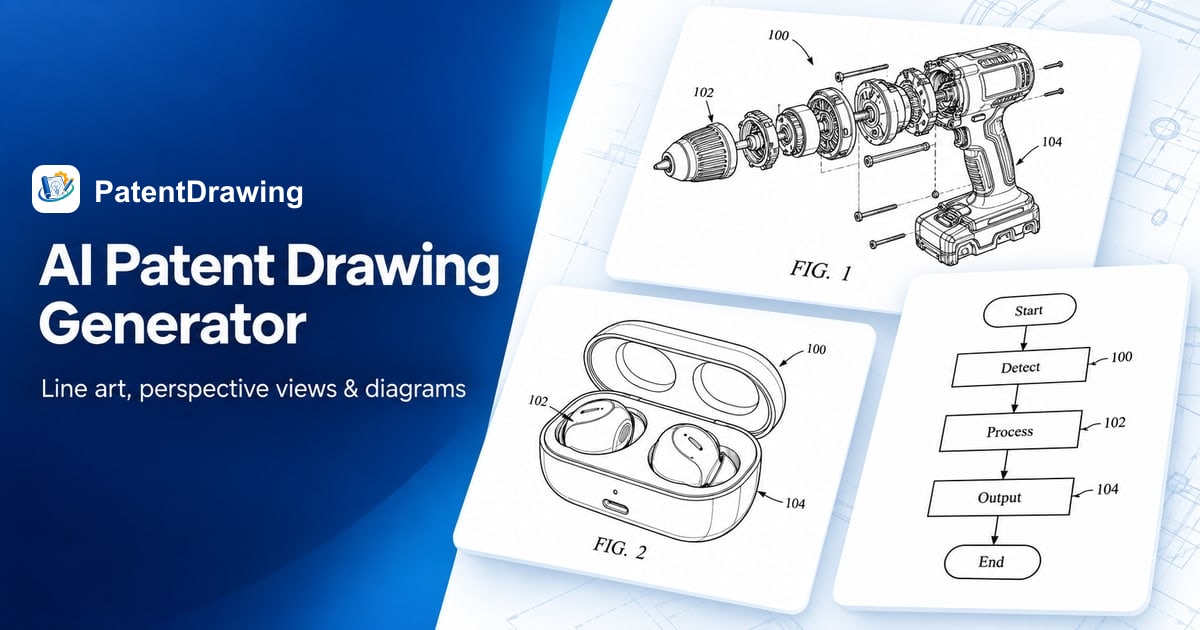
PatentDrawing helps you create clear, patent-style visuals from text or reference images. Generate black-and-white patent line art, 3D-style perspective views, and flowchart/block-diagram drafts so you can communicate product form, assemblies, and system relationships more easily.
Start by describing your invention or uploading a product photo, hand sketch, or CAD screenshot. Choose the drawing direction you need—line art, perspective/multi-view sets, exploded views, or flowcharts—then review the output for geometry, labels, arrows, and relationships before using it in your patent workflow.
Downloads are provided as high-resolution PNG files. PNGs are flat images, so they’re intended for review and sharing; you can refine results by adjusting your prompt or reference and generating a new version.
What can I generate with PatentDrawing.app?
You can generate patent-style black-and-white line art, 3D-style perspective and multi-view drawings, exploded views, and flowcharts/block-diagram drafts.
What types of inputs does PatentDrawing accept?
You can start from text descriptions or upload a product photo, hand sketch, or a CAD screenshot as a reference.
Does the 3D perspective result create a real 3D model I can rotate or edit?
No—results are provided as flat PNG images, not a rotatable 3D model or an editable CAD file.
How does the workflow work from idea to final image?
Describe or upload your invention/reference, request the drawing type and view direction, review geometry/labels/relationships, then download the high-resolution PNG.
Can I refine a drawing after reviewing it?
Yes. Adjust your prompt or reference and generate another version, then re-check the PNG against the invention.
Are the generated drawings ready to file as-is?
They’re drafts for review and preparation. You should verify applicable patent-office requirements separately and confirm geometry and labeled relationships yourself.