
rgbtocmyk.net
RGB to CMYK Converter
Free online RGB to CMYK converter for printing with real-time preview, ICC profile options, and secure in-browser processing—no sign-up required.
Listing signals
Domain rating
25
Domain rating is Ahrefs' measure of domain quality according to links.
Popularity
Low
Page views, clicks to the site and upvotes in the last 30 days, ranked against every live listing.
About tool
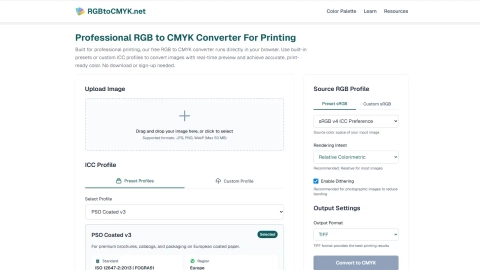
rgbtocmyk.net converts RGB images into print-ready CMYK directly in your browser. Upload a JPG, PNG, or WebP (up to 50 MB), then choose from built-in ICC preset profiles or load a custom ICC profile for tighter control over how your colors translate to your printer and paper.
Refine the conversion using rendering intent settings—Perceptual, Relative Colorimetric, Saturation, or Absolute Colorimetric (Relative Colorimetric is recommended for most images). Black Point Compensation is built in, and optional dithering can help reduce banding for smoother photographic gradients.
Get a real-time, before/after preview so you can check color shifts immediately. Export in TIFF (recommended for best print results) or as JPG/PNG, while uploaded files are deleted after download or automatically removed within minutes.
What file types can I convert with rgbtocmyk.net?
You can upload JPG, PNG, and WebP files. The maximum upload size is 50 MB per image.
Do I need to download anything or create an account?
No. The conversion runs in your browser and doesn’t require sign-up or downloads.
What are ICC profiles, and why do they matter for RGB to CMYK?
ICC profiles describe color spaces and the printable color range under specific conditions. Picking the right Source RGB and destination CMYK/print profiles helps produce more accurate, consistent results for your printer and paper.
Which rendering intent options are available?
Perceptual, Relative Colorimetric, Saturation, and Absolute Colorimetric. Relative Colorimetric is recommended for most images.
Does it include Black Point Compensation and dithering?
Black Point Compensation is built in by default. Dithering is optional and is recommended for photographic images to reduce visible banding in gradients.
What can I export after converting to CMYK?
You can export in TIFF (recommended for printing), or as JPG/PNG.