teleprompter.works
Teleprompter App for Creators
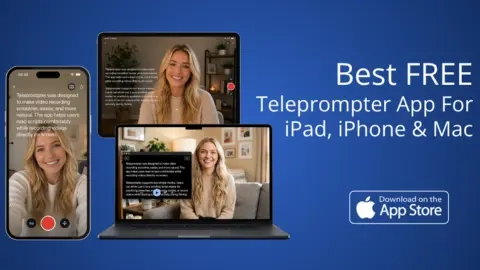
Teleprompter-Scrolling Scripts is a lightweight teleprompter app for iPhone, iPad, and Mac that scrolls your script for natural, on-lens recording.
Listing signals
Domain rating
24
Domain rating is Ahrefs' measure of domain quality according to links.
Popularity
Low
Page views, clicks to the site and upvotes in the last 30 days, ranked against every live listing.
About tool
Teleprompter.works (Teleprompter-Scrolling Scripts) helps you read scripts naturally without memorizing every line. It’s built for creator workflows—so you can record for TikTok, Reels, YouTube, presentations, online courses, interviews, podcasts, and livestreams.
Choose how you use the app: Prompter mode for text scrolling, Camera mode to overlay your script on the live camera view, or Voice mode to capture audio. It also supports a reading workflow across iPhone, iPad, and Mac, with device-appropriate layouts for short clips, longer lessons, and desktop sessions.
The reading experience is fully adjustable. Tune the scrolling speed, text size, colors, line spacing, and the reading area position and size so the script sits where your eyes naturally rest from your actual recording distance—helping you keep your focus on the lens and sound more confident.
Can I record video while reading my script?
Yes—use Camera mode to overlay your script on the live iOS or Mac camera view while you record.
Does Teleprompter.works work offline?
Yes. The app supports a local-first recording workflow so you can write, rehearse, and record offline.
What’s the difference between Prompter mode, Camera mode, and Voice mode?
Prompter mode scrolls your text for reading, Camera mode overlays the script while you record video, and Voice mode focuses on capturing audio with the script experience.
Will it work for TikTok, Reels, YouTube, and online courses?
Yes. It’s designed for short-form social content as well as presentations and online courses, plus interviews, podcasts, and livestreams.
Which device should I use for teleprompter recording?
Use iPhone for short-form clips, iPad for longer lessons with a larger readable canvas, and Mac for desktop recording and longer sessions like Zoom calls and desk recording.
Can I customize how the script appears while scrolling?
Yes. Adjust scrolling speed, text size, text color, line spacing, and the text area size and position to match your camera angle and reading habit.