
whatsapptools.com
WhatsApp Tools Directory
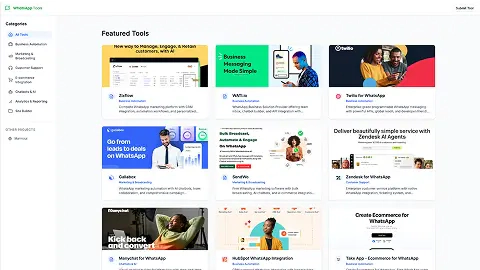
WhatsAppTools.com helps you compare WhatsApp Business tools by category, with guides and tool comparisons for automation, marketing, support, AI, and ecommerce.
Listing signals
Domain rating
7
Domain rating is Ahrefs' measure of domain quality according to links.
Popularity
Low
Page views, clicks to the site and upvotes in the last 30 days, ranked against every live listing.
What is whatsapptools.com?
WhatsAppTools.com is a curated directory for finding WhatsApp business tools built for real business workflows—automation, marketing, customer support, AI chatbots, analytics, and ecommerce flows.
If you’re deciding how to run WhatsApp for your team, WhatsAppTools.com focuses on one practical job: helping you narrow from “many features” to the right approach for your goal. Browse by category—Business Automation, Marketing & Broadcasting, Customer Support, E-commerce Integration, AI Agents & Chatbots, Analytics & Reporting, and Site Builder—to quickly match tools to your use case. Each tool entry and comparison is designed to help you shortlist options based on what they’re best at, not just what they claim.
A key part of the selection process is WhatsApp Business API fit. Many WhatsApp tools work through the official WhatsApp Business API, which is what enables template messaging at scale and automated workflows (instead of relying on the single-user WhatsApp Business app). When you shortlist vendors, you’ll want to validate details that affect day-to-day operations, such as official API usage, native integrations with your CRM/store, and how pricing handles Meta’s per-message conversation costs.
What you can use it for
- Compare WhatsApp tool categories like automation, broadcasts, support inboxes, AI agents, analytics, and ecommerce
- Review featured options and head-to-head comparisons to narrow your shortlist
- Use category guides to understand which capabilities matter for your primary goal (campaigns, support volume, or commerce flows)
WhatsApp tool categories you can browse
- Business automation tools for CRM/helpdesk/store-connected workflows
- Marketing & broadcasting tools for approved template campaigns and reporting
- Customer support tools like shared inboxes and ticketing
- AI agents & chatbots for answering and qualifying customers
- E-commerce integration tools for commerce flows inside WhatsApp
Included resources and utilities
WhatsAppTools.com also provides supporting resources such as a WhatsApp link generator (wa.me click-to-chat links with a prefilled message) and an RTO cost calculator for cash-on-delivery returns.
How to choose a tool in practice
Use your primary objective first, then confirm API usage, integration alignment (e.g., CRM/store), and transparent pass-through of Meta conversation rates so your setup matches how you’ll run WhatsApp operationally.
whatsapptools.com FAQ
What kinds of WhatsApp business tools can I find on WhatsAppTools.com?
On WhatsAppTools.com you can browse tools for business automation, marketing & broadcasting, customer support, AI agents & chatbots, e-commerce integration, analytics & reporting, and site building.
How should I decide which WhatsApp tool is right for my business on WhatsAppTools.com?
Start with your primary goal—automation, marketing campaigns, customer support, or WhatsApp commerce flows—then compare tools that target that job. WhatsAppTools.com is organized so you can shortlist based on use case rather than feature count.
Do the WhatsApp tools listed on WhatsAppTools.com support integrations with CRM or stores?
Some WhatsApp tools are built around workflows that sync with CRMs or connect to stores. On WhatsAppTools.com, you can check each tool’s integration approach to confirm it fits your existing stack.
Should I look for official WhatsApp Business API usage before choosing a tool from WhatsAppTools.com?
Yes—especially if you need automation or messaging at scale. WhatsAppTools.com focuses on tools that typically connect through the official WhatsApp Business API so you can use WhatsApp template messaging and run team workflows.
Is there a way to compare WhatsApp tools by category on WhatsAppTools.com?
Yes. WhatsAppTools.com groups tools into categories like Business Automation, Marketing & Broadcasting, Customer Support, AI Agents & Chatbots, E-commerce Integration, and Analytics & Reporting so you can narrow quickly.
Can I read reviews or comparisons before choosing a WhatsApp tool on WhatsAppTools.com?
Yes. WhatsAppTools.com includes tool listings plus tool comparisons to help you shortlist options based on what each tool is best for within your workflow.
Is WhatsAppTools.com free to use for browsing and comparing tools?
WhatsAppTools.com is a directory you can browse for free, and it also offers free utilities such as a WhatsApp link generator and an RTO cost calculator.
What are some alternatives to whatsapptools.com?
Similar listings to compare with whatsapptools.com:
- GetApp.com: General business software discovery and comparisons across many categories.
- AICenter.ai: AI tool discovery and category-based comparisons with reviewed listings.
- Neobanque.ch: Category browsing and comparisons for banking tools by use case and market.