
texttospeechai.app
Text to Speech AI
Turn any script into natural AI speech with celebrity/character voices, voice cloning, voice design, and emotion-tagged multi-speaker dialogue.
Listing signals
Domain rating
11
Domain rating is Ahrefs' measure of domain quality according to links.
Popularity
Medium
Page views, clicks to the site and upvotes in the last 30 days, ranked against every live listing.
About tool
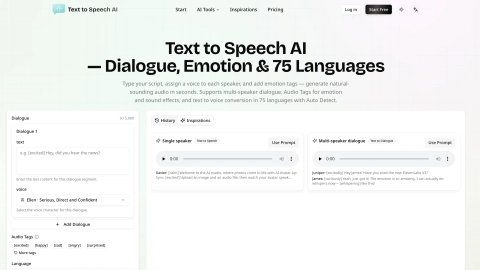
Text to Speech AI is an online text-to-speech generator that turns your script into natural-sounding spoken audio. Pick from real celebrity and character voices (plus natural narrator options), then generate speech instantly for content like videos, shorts, podcasts, skits, and memes.
Beyond single-speaker TTS, you can clone your own voice from a short recording for consistent brand sound, or design a brand-new voice from a plain-text description. For conversations, switch to multi-speaker dialogue, assign a voice to each character, and generate the full exchange as one audio file.
Add inline Audio Tags to control emotion, delivery, pacing, and sound effects (for example, [excited], [whispers], [laughing], or sound-effect cues). You can preview voices before generating, then play back in-browser and download the audio for your workflow.
What can I generate with Text to Speech AI?
You can convert a script into speech using celebrity or character voices, create single-speaker narration, and generate multi-speaker dialogue as one audio file.
How do Audio Tags work in the script?
Insert inline markers like [excited], [whispers], [laughing], or sound-effect cues. The AI uses the tags during generation to shape emotion, delivery, pacing, and effects as part of the spoken output.
Can I clone my own voice?
Yes. Upload a short recording to clone your voice, then reuse the cloned voice to read any script for a consistent sound across content.
Can I create a completely new voice from text?
Yes. In Voice Design mode, describe the voice you want (age, gender, tone, accent, or character), and the tool generates a brand-new voice that matches your description.
What is multi-speaker dialogue TTS?
It’s conversation-style audio where each line is assigned a different voice. The result is a single audio file for the full dialogue with more natural back-and-forth pacing.
Can I preview voices before I generate?
Yes. Browse the voice library and use the instant audio preview to hear a voice’s tone and character before generating your final speech.