Zipic
Zipic
Zipic is a privacy-first Mac & Windows app that compresses, converts, and resizes images locally in batches.
Listing signals
Popularity
High
Page views, clicks to the site and upvotes in the last 30 days, ranked against every live listing.
What is Zipic?
Zipic is a local image compression app for macOS and Windows that lets you compress, convert, and resize images in single-file or batch workflows without uploading your files.
Local compression on macOS and Windows
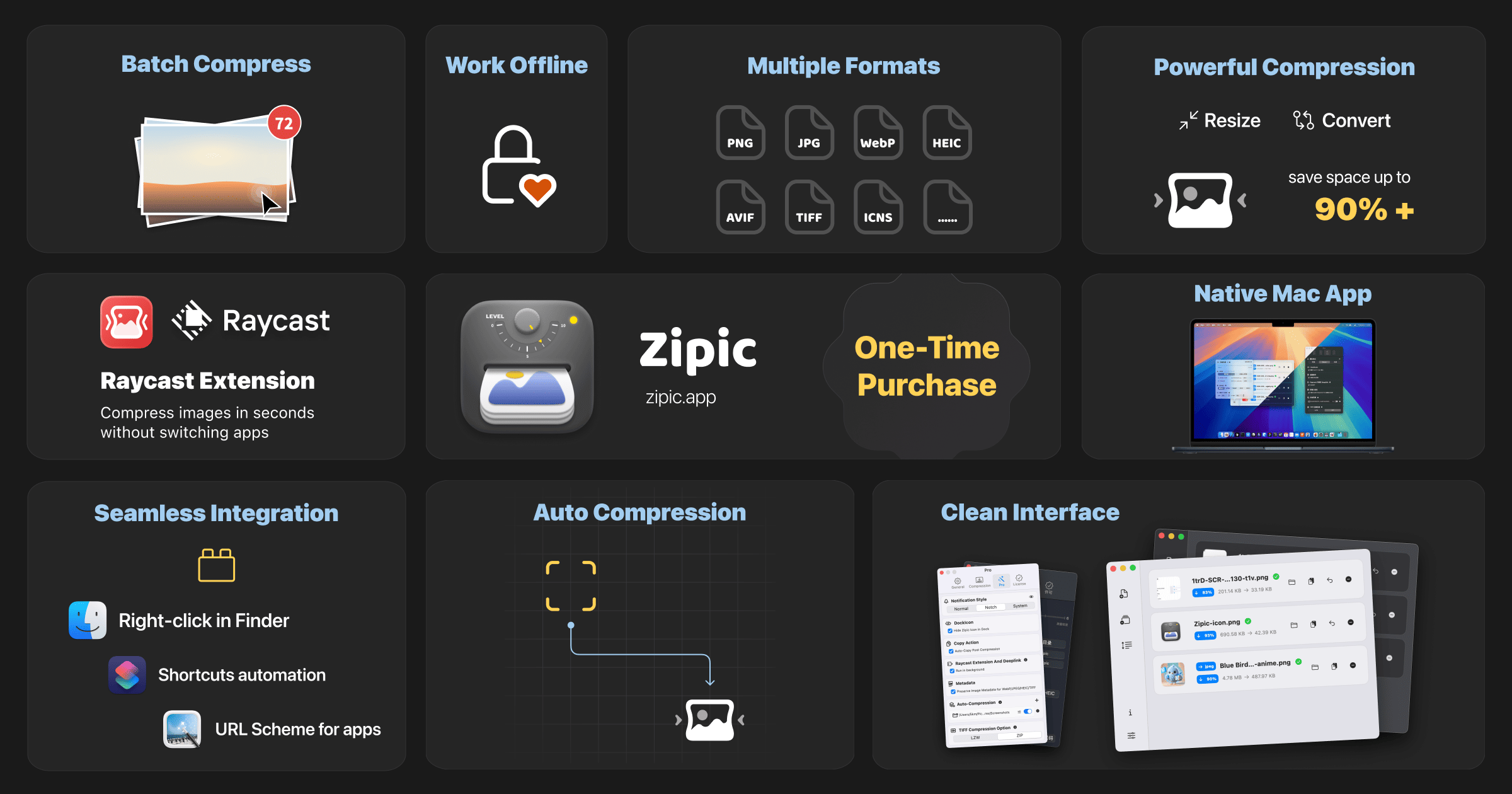
Zipic provides native apps for macOS and Windows and processes images locally on your device. That means your images are never uploaded and compression works offline.
Batch processing with drag-and-drop workflows
You can compress one file or process multiple images in bulk. Common ways to start include drag-and-drop, hotkeys, menu access, and folder monitoring. Zipic also supports automation-oriented workflows such as the Zipic CLI, Apple Shortcuts, a Raycast extension, and a URL scheme.
Supported formats (including Pro formats)
Zipic covers popular image and document formats for your daily optimization tasks, including:
- JPEG, PNG, WebP, HEIC, GIF
- AVIF, JPEG XL (JXL), TIFF, ICNS (macOS), ICO (Windows)
- PDF, SVG, APNG
- Native WebP encoding, including animated WebP
Pro features expand advanced format conversion options and include additional controls.
Compression control with presets
Zipic uses compression levels (six available, where a higher level means greater compression). It also supports custom presets so you can save quality/compression settings for different scenarios and switch them quickly.
You can choose how results are saved, including options such as replacing originals or creating new files with a suffix, plus metadata-related options available in Pro.
Pricing and Pro access
Zipic uses one-time purchase licensing with lifetime updates.
- Free: 7-day full Pro trial, then 25 images/day with basic features
- Personal Pro: $29.99 (unlimited compressions; 2 devices; includes Notch Drop, clipboard auto-compress, Pro formats, unlimited presets + favorites, and folder watch)
- Team Pro: $129.99 (covers 10 devices; includes priority support)
System requirements
- macOS 13.0+ (optimized for Apple Silicon and Intel Macs)
- Windows 10+ (beta)
Zipic FAQ
How do I compress images with Zipic?
Zipic supports several compression methods: drag images or folders into the main window (recommended), use Notch Drop (Pro) by dragging to the screen notch, enable clipboard auto-compress (Pro), and use folder monitoring (Pro) to auto-compress new files. You can also open files from the main window, use the menu bar, right-click integrations in Finder, or compress from the Raycast extension.
What image formats are supported in Zipic?
Zipic supports JPEG, PNG, WebP, HEIC, AVIF, JPEG XL (JXL), TIFF, GIF, PDF, SVG, and APNG, plus ICNS on macOS and ICO on Windows. It also includes native WebP encoding, including animated WebP. Pro features provide access to advanced format conversion options for formats such as AVIF, JXL, TIFF, PDF, SVG, and APNG.
Can Zipic resize and convert images, not just compress?
Yes. Zipic is designed for compression plus transformation workflows, including resizing and format conversion between supported formats, and batch processing for multiple files at once.
Does Zipic upload my images to the cloud?
No. Zipic compresses and processes images locally on your device and images are never uploaded.
What do compression presets do in Zipic?
Presets let you store compression quality settings for different scenarios so you can switch between them quickly. Zipic includes ready-to-use defaults, and you can create custom presets; Pro expands preset options.
How many images are included with the Free plan?
Zipic offers a 7-day full Pro trial, and then the Free plan includes 25 images per day with basic features.
What’s included with the Zipic Personal Pro license?
The Zipic Personal Pro license is a one-time purchase for $29.99 and includes unlimited compressions, support for 2 devices, Notch Drop, clipboard auto-compress, Pro formats (including AVIF, JXL, TIFF, ICNS/ICO equivalents, PDF, SVG, and APNG), unlimited presets + favorites, and folder watch auto-compression with silent background monitoring.
How fast does Zipic respond to support requests?
Support typically responds within 24 hours, with documentation at docs.zipic.app and email support@5km.tech.
What are some alternatives to Zipic?
Similar listings to compare with Zipic:
- MB to KB Converter: Compress photos to an exact KB limit with byte preview.
- bulkpictools.com: Free browser tool for bulk compressing, converting, cropping, and resizing.
- heictopng.org: HEIC to PNG conversion with privacy-first on-device processing.
- PDF Studio: Compress and convert PDFs in-browser for document workflows.